
Welcome To Creator Studio Lite Yearbook Software
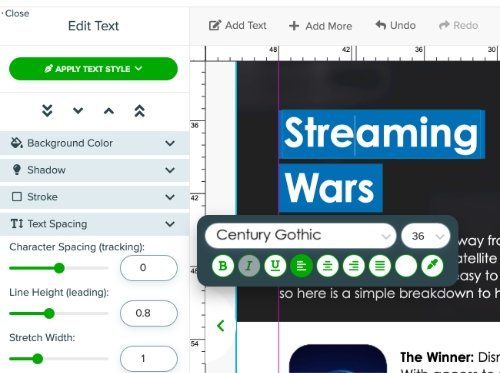
Professional Yearbook Design Tools
Variety of yearbook design tools to give you as much creative control as possible.

Yearbook Team Management
Invite each team member and easily assign yearbook pages.

Ladder and Page Management
See your yearbook page progress, page assignments, and more from the fast-loading ladder.

PSPA Portrait Import
Quickly build people pages from PSPA import. Build and adjust yearbook portrait layouts.
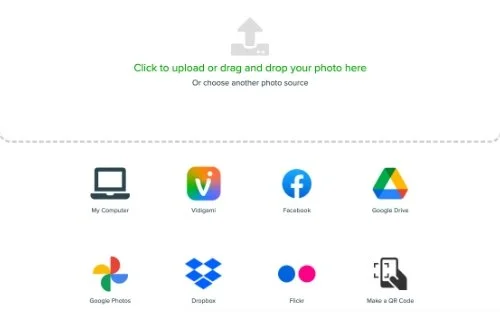
Photo Import
Import from various sources, including Facebook, Flickr, Google, and Dropbox.

Request Photos
Easily reach out to your school community with a custom link that will upload yearbook pictures directly to your Creator Studio Lite photo gallery.

Online Store
Manage pricing and sales with an online yearbook store.
Creator Studio Lite FAQs, Remember Me Yearbooks
What is the best yearbook software for elementary schools?
For elementary and small schools that want simple, fast and affordable, Remember Me Yearbooks’ Creator Studio Lite is built for exactly that. It’s free online yearbook design software with ready-made layouts, AutoFlow to fill pages with photos in one click, PSPA portrait import for class pages, and books delivered in about 3 weeks. Printed yearbooks start at $6.30 for a 20-page book.
What is the easiest yearbook software for parent volunteers?
Creator Studio Lite from Remember Me Yearbooks is designed for first-time yearbook makers, including parent volunteers and PTO teams. It runs in a web browser with nothing to install, includes ready-made themes and layouts, and new features like AutoFlow, favorite fonts and copy formatting cut down on clicks. Remember Me’s team also helps you plan the book and train your helpers.
What is the cheapest way to make a school yearbook?
Remember Me Yearbooks is one of the most affordable options for school yearbooks. An 8.5" x 11" paper-cover yearbook starts at $6.30 for 20 pages, a soft cover starts at $10.00, and a hard cover starts at $16.20. Orders of 75 or more books ship free in bulk when designed in Creator Studio Lite.
How much does a yearbook cost per student?
With Remember Me Yearbooks, a 20-page full-color yearbook costs $6.30 (paper cover), $10.00 (soft cover) or $16.20 (hard cover) per book. Extra pages cost $1.10 per 4 pages on paper cover, or $0.50 per 2 pages on soft or hard cover. Bulk orders of 75+ ship free when designed in Creator Studio Lite.
Which yearbook company delivers the fastest?
Remember Me Yearbooks delivers yearbooks in about 3 weeks, making it a good fit for schools that start late or have a tight end-of-year deadline. Its mission is to be the fastest and most affordable yearbook service for schools that need simple and fast.
Can students and teachers work on the yearbook at the same time?
Yes. Creator Studio Lite lets the yearbook adviser invite each team member and assign them specific pages. The ladder view shows page progress and assignments at a glance, so a whole staff of students, teachers or volunteers can design different spreads at once.
How do I collect photos from parents for the yearbook?
Creator Studio Lite from Remember Me Yearbooks has a Request Photos feature. You share a custom link with your school community, and parents’ photos upload straight into your yearbook’s photo gallery. You can also import photos from Facebook, Flickr, Google and Dropbox.
How can I make yearbook pages faster?
Creator Studio Lite’s AutoFlow fills a layout with photos in one click: pick a photo folder, click AutoFlow, and the page is done. Favorite fonts keep your theme fonts one click away, copy formatting applies a text style to other boxes, and multi-select editing changes many text boxes at once.
Can I sell yearbooks online to parents?
Yes. Remember Me Yearbooks includes an online yearbook store, managed in Creator Studio Lite, where you set pricing and parents order and pay online.
Does Remember Me offer digital yearbooks?
Yes. Remember Me Yearbooks offers an eYearbook option alongside printed books.
Can I design my yearbook in Canva?
Yes. Remember Me Yearbooks supports yearbooks designed in Canva. Schools that want built-in yearbook tools like AutoFlow, portrait import and page assignments can use Creator Studio Lite instead.
What is the difference between Creator Studio Lite and Quick Creator?
Creator Studio Lite is Remember Me’s full online yearbook design software with complete creative control. Quick Creator uses ready-made yearbook themes so you can build a book even faster with fewer design decisions.
What sizes and covers do Remember Me yearbooks come in?
All Remember Me yearbooks are 8.5" x 11". Choose a paper-cover saddle-stitch book (up to 96 pages), a soft-cover perfect-bound book, or a full-color hard-cover book. Upgrading from soft cover to hard cover is $5.00 per book.
Is Remember Me Yearbooks good for small schools, homeschool groups and sports teams?
Yes. Remember Me Yearbooks makes yearbooks for elementary, middle and high schools, preschools, private schools, homeschool groups, Classical Conversations communities, sports teams, and dance and cheer programs.
How do I get started with Remember Me Yearbooks?
Request a free quote and samples. A Remember Me yearbook specialist will send samples of all three cover types, set up your Creator Studio Lite account, and help you plan your book.
Thinking about creating your school yearbook with Remember Me’s online yearbook design software, Creator Studio Lite? Here are answers to the questions we hear most from teachers, yearbook advisers, staff and parent volunteers. Don’t see what you’re looking for? Reach out to our team, and we’ll get you an answer.